I wasted an entire Saturday building an Amazon deals bot with Selenium. It worked for 36 hours. Then Amazon changed something, my selectors broke, and I got a CAPTCHA wall that basically said “we know what you’re doing, please stop.”
That frustration is literally why I built the infrastructure — proxies, rendering, rate limiting — all behind a single /deals endpoint on our Amazon Product Data API
.
~20 min
Python setup time
~15 min
Google Sheets setup time
250
Free requests/month
22
Amazon marketplaces supported
Pick your path:
| Python | Google Sheets | |
|---|---|---|
| Setup time | ~20 minutes | ~15 minutes |
| Coding required | Yes (Python) | No (copy-paste) |
| Server needed | Yes (VPS or local + cron) | No (Google runs it) |
| Deal history | JSON file | Spreadsheet (sortable) |
| Custom filters | Full flexibility | API params only |
| Multi-marketplace | Easy (loop) | Duplicate sheet |
| Best for | Developers, power users | Non-technical users, quick setup |
What you’ll need before starting
Regardless of which version you pick, you need two things set up first.
Get your Amazon deals API key
We’ll use the Amazon Product Data API
to fetch deals. It has a dedicated /deals endpoint
that returns live Amazon promotions with all the data we need: title, image, price, original price, discount percentage, product URL, and deal timing.
The FlyByAPIs Amazon data extraction API free tier gives you 100 requests per month. That’s enough to check for new deals daily without paying a cent.
- Go to RapidApi and create a new account if you don’t have one
- Go to the Amazon Scraper API page on RapidAPI
- Click “Subscribe to Test”
- Pick the free plan
- Copy your API key from the header parameters. If you go to any endpoint , check the field X-RapidAPI-Key.
Create your Telegram bot
- Open Telegram and search for @BotFather
- Send
/newbotand follow the prompts (pick a name and username) - BotFather gives you a bot token — save it somewhere safe
- Create a Telegram channel or group where the bot will post deals
- Add the bot as an admin to that channel
- To get your chat ID: send a message in the channel, then open
https://api.telegram.org/bot<YOUR_TOKEN>/getUpdatesin your browser. Look for"chat":{"id": ...}— that number (e.g.-1001234567890) is your chat ID. Use the number directly, not the username —@channel_namewon’t work.
An Amazon deals bot fetches live deals from Amazon and sends Telegram alerts with product images, prices, and direct links — without scraping anything directly. With the FlyByAPIs Amazon Product Data API, you get 100 free requests/month and 22 marketplaces. Setup takes 15–20 minutes.
Python version
Full script with deduplication logic and cron automation. Total control over filters and scheduling.
~20 min setupGoogle Sheets version
Apps Script inside a spreadsheet. No terminal, no server, no Python. Deal history stays in the sheet.
~15 min setupAll the code from this tutorial — Python script and Google Sheets Apps Script — is available in the FlyByAPIs GitHub repo . Copy, fork, or use as a starting point.
Developer version (Python)
This version gives you full control. You’ll write a Python script that:
- Calls the Amazon deals API
- Filters deals by discount percentage
- Checks a local JSON file to skip deals already sent
- Sends a formatted message with image to your Telegram channel
- Logs everything so you can debug when needed
Step 1: Install dependencies
| |
That’s it. We’re using requests for HTTP calls and the Telegram Bot API directly via HTTP. No extra libraries needed.
Step 2: The full script
Create a file called amazon_deals_bot.py and replace YOUR_RAPIDAPI_KEY, YOUR_TELEGRAM_BOT_TOKEN, YOUR_CHAT_ID:
| |
Step 3: Run it
| |
You should see deals popping up in your Telegram channel within seconds. Each message includes the product image, the original price, the deal price with discount percentage, star rating, and a direct link to the Amazon product page.
Step 4: Automate it with cron
Run the bot every hour automatically:
| |
Add this line:
| |
Now your Amazon deals bot checks for new deals every hour and only sends the ones you haven’t seen before — all powered by the Amazon Product Data API . Set it and forget it.
One thing to keep in mind: the sent_deals.json file grows over time. If you plan to run this for months, add a cleanup step that keeps only the last 1,000 deal IDs — otherwise the file gets bloated for no reason.
Customizing the developer version
A few things you can tweak:
- Change
MIN_DISCOUNTto 20 for more deals or 70 for only the best discounts - Filter by category — set
CATEGORYto a numeric ID (e.g.15684181for Automotive). To find the right ID, open the RapidAPI playground for/category-list, hit Test Endpoint, and copy thecategory_nodevalue for the category you want - Multiple marketplaces — loop through
["com", "co.uk", "de"]to monitor deals across countries
No-code version (Google Sheets)
This version does the same thing but lives entirely inside a Google Sheet. No Python, no terminal, no server. Just a spreadsheet and Google Apps Script.
Here’s how it works: the Sheet has two tabs. One stores the deal history (so nothing gets sent twice). The other holds your settings. A script runs on a timer, fetches deals from the API, checks against the history, and sends new ones to Telegram.
Step 1: Create the spreadsheet
- Open Google Sheets and create a new spreadsheet
- Rename the first tab to Settings
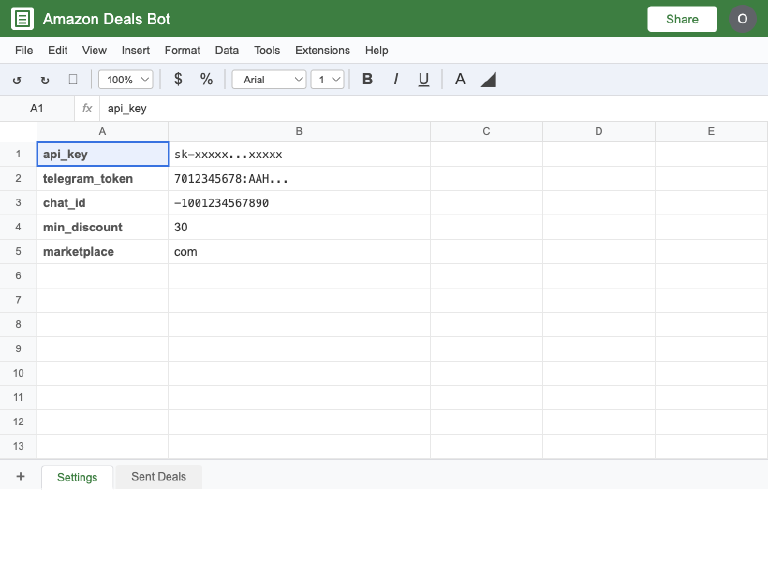
- Add these rows:
| A | B |
|---|---|
api_key | YOUR_RAPIDAPI_KEY |
telegram_token | YOUR_TELEGRAM_BOT_TOKEN |
chat_id | numeric ID from getUpdates (e.g. -1001234567890) — not @username |
marketplace | com |
language | en |
page_size | 30 |
min_discount | 30 |
min_price | (leave blank to skip) |
max_price | (leave blank to skip) |
category | (leave blank to skip) |
min_rating | (leave blank to skip) |
is_prime | true |
- Create a second tab called Sent Deals
- In row 1 of “Sent Deals”, add these headers:
deal_id,title,price,discount,sent_at
Your Settings tab should look like this:
Step 2: Add the Apps Script
Go to Extensions > Apps Script. Delete whatever is there and paste this:
| |
Step 3: Test it
Click the Save button and the Run button (play icon) at the top. Google will ask for permissions the first time — approve them. Check your Telegram channel. You should see deals with images arriving within seconds.
Step 4: Set up automatic triggers
- In Apps Script, click the clock icon on the left sidebar (Triggers)
- Click Add Trigger at the bottom right of the page
- Set it to run
fetchAndSendDealsevery 1 hour (or whatever interval you want) - Save
That’s it. Your Amazon deals bot is now running automatically. Every hour it checks for new deals, skips anything already sent, and pushes fresh alerts to your Telegram channel with the product image and all the details.
Why the Google Sheets version is surprisingly good
I was skeptical about this approach at first. But there are real advantages — ones that even experienced developers might prefer.
The deal history lives right in the spreadsheet. You can see every deal you’ve ever sent, sort by discount, filter by date. It doubles as a deals database without any extra work.
Pro tip
Want to run bots for multiple niches? Duplicate the Google Sheet once per niche — Electronics, Kitchen, Books — swap the category filter in Settings, and each sheet runs independently on its own trigger. Zero extra infrastructure.
There’s no server to maintain. Google runs the script for you — no cron, no VPS, no Docker. Want to share it? Duplicate the sheet, swap in a new Amazon scraper API key and Telegram token, and you have a second bot running for a different marketplace in two minutes.
And it’s free. Google Apps Script has generous quotas, and the free tier of the Amazon API (100 requests/month) is enough to get started with daily checks.
100 requests/month free · 25 endpoints · 22 marketplaces
What the Telegram messages look like
Here’s what each message looks like in your channel:
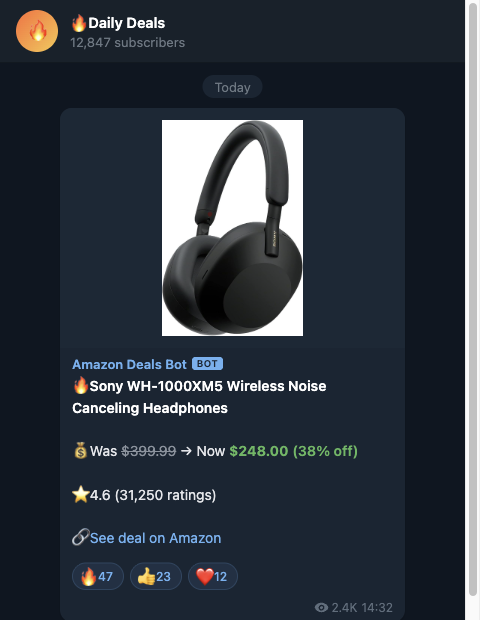
Product image at the top, bold title, original price vs. deal price with discount percentage, star rating, and a direct link. Clean, scannable, and gives your subscribers everything they need to decide if a deal is worth clicking.
"No affiliate links, no redirect spam — just a direct Amazon URL and all the data your subscribers need to buy in one tap."
Filtering tricks to get better deal alerts
The Amazon deals endpoint supports some useful filters you should take advantage of:
| Filter | What it does | Example |
|---|---|---|
marketplace | Amazon country store (22 supported) | com US · co.uk UK · de Germany · fr France · it Italy · es Spain · ca Canada · com.au Australia · co.jp Japan · in India · com.br Brazil · com.mx Mexico · nl Netherlands · se Sweden · pl Poland · com.tr Turkey · ae UAE · sa Saudi Arabia · eg Egypt · com.be Belgium · ie Ireland · sg Singapore |
language | Language for results | en, es, de |
page_size | Number of deals returned (max 300) | 30 |
min_discount | Only deals above X% off | 50 for big discounts only |
max_discount | Cap the discount percentage | 80 to exclude weird outliers |
min_price / max_price | Price range filter | 10 / 100 for mid-range deals |
category | Specific Amazon department (numeric ID) | 15684181 for Automotive |
min_rating | Minimum star rating | 4 for well-reviewed products only |
is_prime | Prime-eligible deals only | true |
For a quality-focused deal alert channel, I’d recommend: min_discount=40, min_rating=4, is_prime=true. This gives you fewer deals but everything you send is genuinely worth buying.
300
live deals returned per single API request
What about Kindle daily deals?
If you’re specifically after Amazon Kindle daily deals, the same approach works with the Amazon product data extraction API . Filter by the Books or Kindle Store category and lower the minimum discount (Kindle deals tend to be 50-80% off but at lower price points). The API returns the same data structure regardless of category.
You’re live — now what?
You’ve got a working Amazon deals bot. Here are some ideas to take it further:
- Add multiple categories — run the script once per category to send themed updates (tech deals, kitchen deals, book deals)
- Build a deals website — save deals to a database and display them on a simple site. The data is already structured, you just need a frontend. Pair it with the Google Maps data API to show local store availability
- Cross-post to Discord — the Telegram bot logic translates almost 1:1 to Discord webhooks. You could even combine it with our Google Search API to find coupon codes for each deal automatically
- Research deal brands — use the Crunchbase funding data API to pull company profiles and funding rounds for the brands behind the deals. Useful for filtering by brand size or finding emerging D2C sellers
- Price history tracking — combine the deals bot with the price tracking approach to identify deals that are actually at their lowest price ever
The FlyByAPIs Amazon Product Data API
has 25 endpoints across 22 marketplaces. A single API request to the /deals endpoint can return up to 300 live Amazon promotions in structured JSON — no scraping, no proxies, no maintenance. The deals endpoint is just the start.
Free tier available · Results in under 2 seconds
P.S. If you build something cool with this, I genuinely want to see it. The best deals channels I’ve found are the ones built by one person who actually cares about the niche. That could be you.