Every scraping guide repeats the same line: CSS selectors are faster than XPath. We got tired of reading it without evidence, so we benchmarked both languages across five libraries. In lxml, the engine that powers Scrapy’s selectors, XPath won 3 of the 5 tests.
The CSS selector vs XPath question is really a choice between two query languages for pointing at elements in a parsed HTML tree: CSS describes what an element looks like, while XPath describes how to walk to it, in any direction. That is the real difference.
The problem with that debate is that most advice comes from 2013-era Selenium folklore. The most-cited benchmark on Stack Overflow predates a decade of browser engine optimization.
So we did the homework. We wrote equivalent CSS and XPath queries, verified they return identical elements, and timed them in lxml, parsel (Scrapy), BeautifulSoup, Selenium, and Playwright. This page is the result: a full translation cheat sheet plus numbers you can reproduce.
22
Paired syntax examples
5
Libraries benchmarked
40x
Peak CSS speed edge in Chrome
3 of 5
Tasks XPath won in lxml
At FlyByAPIs we run scraping infrastructure that processes millions of requests per month across Amazon product pages with our scraping API , Google, and other hostile targets, so selector breakage is not theoretical for us. It is a Tuesday.
In short: use CSS selectors by default because they are shorter and every library supports them. Switch to XPath when you need to match text, climb up the DOM, or you are in Scrapy and lxml, where CSS is silently compiled to XPath anyway. Speed is the weakest reason to choose either: CSS won our browser tests by 4 to 40x while XPath won 3 of 5 tasks in lxml, and both gaps are microseconds next to network requests that cost milliseconds.
Every benchmark in this post is runnable. The full code, the query pairs, and the test harness live in flybyapis/blog-web-scraping-code → css-selector-vs-xpath. Clone it and check our numbers on your own machine.
The short answer: which one should you use?
Both languages solve the same problem: pointing at elements in a parsed HTML tree. CSS selectors came from styling, XPath came from querying XML. That origin difference explains almost everything about how they behave today.
CSS is a pattern language. It describes what an element looks like: its tag, classes, attributes, position among siblings.
XPath is a path language. It describes how to walk to an element, in any direction, with conditions and functions along the way.
CSS selectors
Short, readable, supported everywhere. The default choice for stable pages with sane class names. Cannot match text or select a parent (outside browsers with :has()).
XPath
Verbose but strictly more powerful. Matches text, walks up to parents and ancestors, filters with functions. The native language of lxml and Scrapy. Unavailable in BeautifulSoup.
The honest heuristic after years of writing both: reach for CSS first, and switch to XPath the moment you catch yourself fighting the selector instead of writing it. The cheat sheet below shows exactly where that line sits.
CSS selectors vs XPath syntax: the translation cheat sheet
Same task, both languages, side by side. These 22 pairs cover pretty much everything you will write in a scraper. Bookmark this section; it is the reference we wish existed when we started.
| Task | CSS selector | XPath |
|---|---|---|
| All links | a | //a |
| By ID | #main | //*[@id="main"] |
| By class | .price | //*[contains(concat(" ", normalize-space(@class), " "), " price ")] |
| Tag with exact class attr | p.price (any class list) | //p[@class="price"] (exact string only) |
| Attribute exists | img[alt] | //img[@alt] |
| Attribute equals | input[type="submit"] | //input[@type="submit"] |
| Attribute starts with | a[href^="/product"] | //a[starts-with(@href, "/product")] |
| Attribute ends with | a[href$=".pdf"] | //a[substring(@href, string-length(@href) - 3) = ".pdf"] (no ends-with in XPath 1.0) |
| Attribute contains | a[href*="amazon"] | //a[contains(@href, "amazon")] |
| Direct child | ul > li | //ul/li |
| Any descendant | div a | //div//a |
| First item | ul > li:first-child | //ul/li[1] |
| Last item | ul > li:last-child | //ul/li[last()] |
| Third item | ul > li:nth-child(3) | //ul/li[3] (nth-child counts every sibling, li[3] counts only li) |
| Next sibling (immediate) | h2 + p | //h2/following-sibling::*[1][self::p] |
| All following siblings | h2 ~ p | //h2/following-sibling::p |
| Exact text match | Not possible | //button[normalize-space()="Add to cart"] |
| Text contains | Not possible | //h3[contains(., "Python")] (use . not text(): it also matches text inside children) |
| Select the parent | div:has(> img#logo) (not in lxml/Scrapy) | //img[@id="logo"]/parent::div |
| Any ancestor | Not possible | //span[@class="price"]/ancestor::article |
| Union of two queries | h1, h2 | //h1 | //h2 |
| Negation | input:not([type="hidden"]) | //input[not(@type="hidden")] |
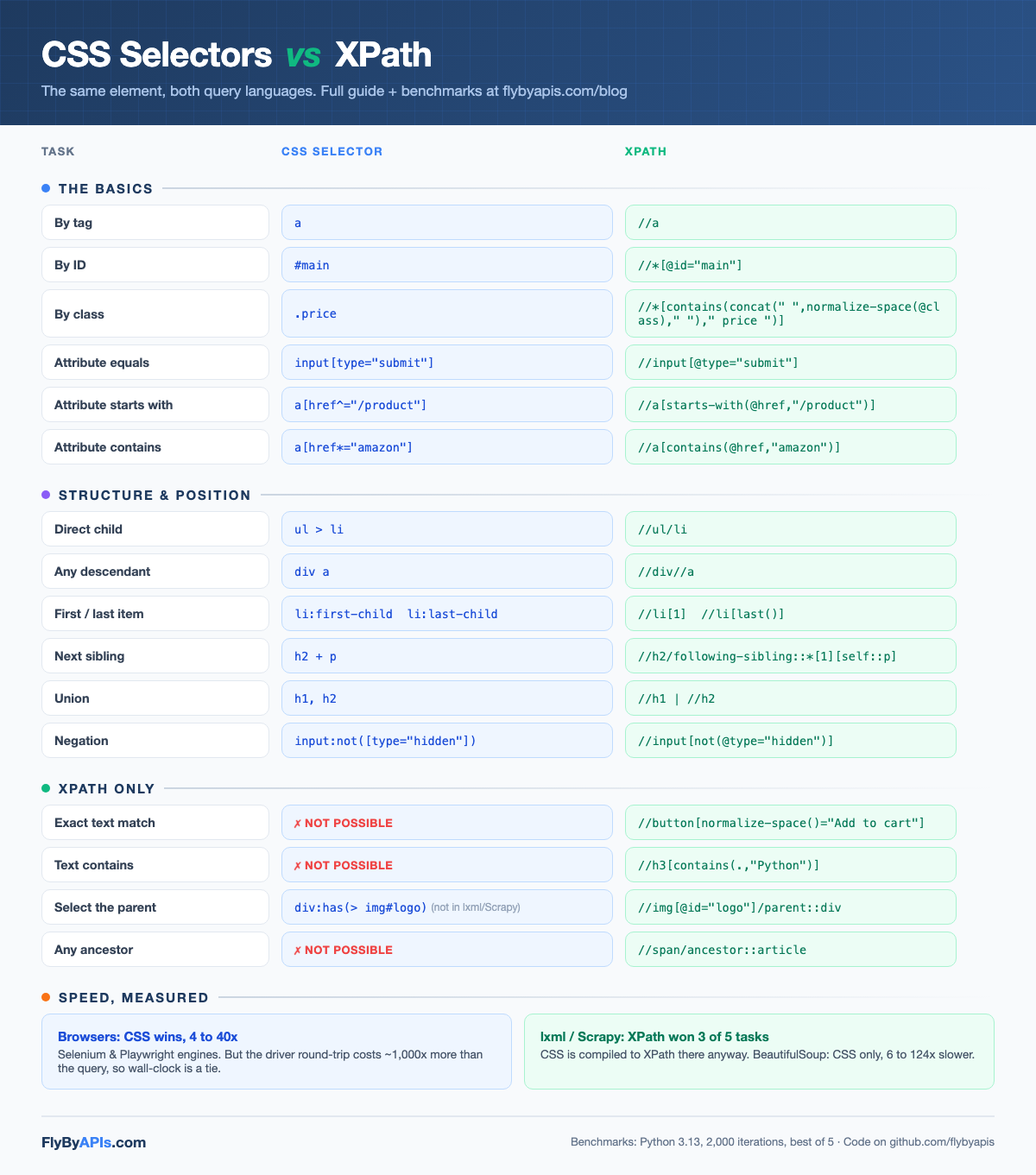
Three rows in that table deserve a closer look, because they are where most scrapers quietly go wrong.
Text matching is XPath-only, and :contains() is a myth
You will see div:contains("price") in old Selenium tutorials and jQuery code. It is not real CSS. :contains() never made it past early drafts of the CSS selectors standard
, and no browser implements it. jQuery and a few libraries ship non-standard lookalikes, which is exactly why the myth survives.
If you need “the button whose label says Add to cart”, XPath is your only clean option. That single capability keeps XPath alive in every serious scraping codebase we have seen.
Ours included: several of the parsers behind the FlyByAPIs Amazon product data scraping API lean on text predicates where Amazon offers no stable attributes.
Myth check:
:contains() is not part of any released CSS specification, and no browser implements it. Standard text matching lives in XPath, with normalize-space() and contains(., "...").
The class-matching trap
Look at row 3. Matching a class in XPath is genuinely ugly, because @class is one string: an element with class="price old" will not match //*[@class="price"]. The naive fix, contains(@class, "price"), silently matches price_old and list-price too.
Pro tip:
For class matching, always prefer CSS (.price). It handles multi-class attributes correctly with three characters. This is the single strongest argument for CSS in day-to-day scraping.
Parent traversal: XPath’s home turf
CSS can now express “the div that contains a logo image” with :has(), but support is patchy. Chrome shipped it in 2022 and BeautifulSoup’s soupsieve handles it, but cssselect, the CSS engine underneath lxml and Scrapy, rejects it outright.
XPath has had parent::, ancestor::, and preceding-sibling:: since 1999, and they work in every XPath engine, everywhere.
The benchmarks: CSS selector vs XPath performance, measured
Here is what nobody ranking for this topic has done: run the numbers on modern engines and publish the code. Our setup, so you can judge it:
- Machine: Apple Silicon Mac, Python 3.13, August 2026
- Page: the books.toscrape.com homepage (51 KB, 20 products), served locally so network noise is zero
- Method: 2,000 iterations per query, best of 5 runs, and every CSS/XPath pair is asserted to return identical element counts before timing
Round 1: parsing libraries (lxml, parsel, BeautifulSoup)
This is where scrapers actually live: Scrapy spiders, lxml pipelines, Python web scraping scripts. Times are microseconds per query.
| Task | lxml CSS | lxml XPath | parsel CSS | parsel XPath | BS4 CSS |
|---|---|---|---|---|---|
| Product links (descendant) | 114.2 µs | 49.7 µs | 113.6 µs | 102.2 µs | 2,079.4 µs |
| Prices (by class) | 102.0 µs | 75.9 µs | 111.9 µs | 86.0 µs | 1,016.6 µs |
| Image alt attributes | 145.5 µs | 309.2 µs | 107.6 µs | 346.2 µs | 902.8 µs |
| 3rd product in each row | 57.7 µs | 38.8 µs | 25.5 µs | 39.9 µs | 3,160.6 µs |
| In-stock labels (nested class) | 160.3 µs | 367.3 µs | 246.8 µs | 550.3 µs | 1,675.8 µs |
Two things jump out. First, XPath won 3 of 5 tasks in lxml. So much for “CSS is always faster.”
Second, BeautifulSoup is 6 to 124x slower than the equivalent lxml or parsel query, typically around 10x. That matches what we found when we compared BeautifulSoup vs Scrapy head to head.
Why does XPath win here? Because in lxml and parsel, CSS does not exist at runtime: every CSS selector is compiled into XPath by the cssselect library before executing. Your tidy p.price_color becomes this:
| |
Do you see what this means? In Scrapy, the CSS vs XPath question is partly an illusion. You are always running XPath; the only question is whether you write it yourself or let a translator generate a defensive, slightly slower version.
Bottom line:
In Scrapy and lxml, tight hand-written XPath is the performance ceiling, and CSS is a convenience layer on top of it. Write whichever is clearer; the machine runs XPath either way.
Round 2: real browsers (Selenium and Playwright)
Browsers flip the story. Chrome’s CSS engine is one of the most heavily optimized code paths in the browser, because it runs on every page render.
XPath goes through document.evaluate, a comparatively dusty code path. We measured both inside the page with performance.now(), no driver overhead included:
| Task | Selenium CSS | Selenium XPath | Playwright CSS | Playwright XPath |
|---|---|---|---|---|
| Product links (descendant) | 2.9 µs | 35.1 µs | 8.2 µs | 31.8 µs |
| Prices (by class) | 1.3 µs | 52.6 µs | 1.9 µs | 34.0 µs |
| In-stock labels (nested class) | 2.4 µs | 69.3 µs | 2.6 µs | 45.8 µs |
CSS wins every browser test, by 4x to 40x. The folklore is true here. But before you rewrite all your XPath, look at what happens when you measure what your script actually experiences: the full driver round-trip.
The driver protocol costs roughly 1,000x more than the query itself. A 50-microsecond XPath inside an 8-millisecond round-trip is a rounding error. In our 30-call medians, XPath sometimes finished the full round-trip faster than CSS, purely on protocol noise.
Bottom line:
In Selenium and Playwright, selector speed is irrelevant to wall-clock time. Choose the selector that will still work after the next site redesign, not the one that saves 30 microseconds.
Which libraries support what
This table settles more arguments than any benchmark. Half the time, your library already made the choice for you.
| Tool | CSS | XPath | Worth knowing |
|---|---|---|---|
| lxml | ✓ | ✓ native | CSS is compiled to XPath via cssselect |
| parsel / Scrapy | ✓ | ✓ native | Chainable: .css("article").xpath(".//a/@href") |
| BeautifulSoup | ✓ (soupsieve) | ✗ none | 6 to 124x slower in our tests; no XPath at all |
| Selenium | ✓ | ✓ | By.CSS_SELECTOR / By.XPATH, browser engines |
| Playwright | ✓ | ✓ | Auto-detects; also has text= and get_by_role() |
| Browser dev tools | ✓ $$() | ✓ $x() | Test selectors live before writing code |
The dev tools row is the workflow tip most tutorials skip. Open the console on any page and test selectors instantly, no script required:
| |
Ten seconds in the console saves ten minutes of scraper debugging.
One warning about dev tools: “Copy selector” and “Copy XPath” generate paths like #content > div:nth-child(2) > article > h3 > a. They work today and break tomorrow, because they encode the page’s entire current structure. Write your own selectors; use the copies only as hints.
Absolute vs relative XPath, in 30 seconds
Absolute XPath walks from the root: /html/body/div[2]/section/article[4]/h3/a. One layout tweak anywhere along that chain kills it.
| |
Relative XPath anchors on something meaningful: //article[@data-sku]//h3/a. It survives everything except a change to the article markup itself.
The rule: never ship an absolute XPath. The only reason they exist is that dev tools generate them.
The part nobody benchmarks: selectors break
Now, the part that actually costs money in production. We have never lost a night of sleep over selector speed. We have lost plenty over selectors that stopped matching at 3 AM.
The best selector language in the world cannot survive what modern sites do to their DOM:
Auto-generated class names
Amazon ships classes like a-section a-spacing-none puis-padding-left-small, and CSS-in-JS frameworks generate hashes like sc-bdVaJa that change every deploy. Your .price selector has a shelf life.
A/B tests serve different DOMs
Two requests to the same URL can return different structures. Your scraper works for 80% of requests and silently returns nothing for the rest, which is worse than failing loudly. This exact failure mode is why we monitor every parser behind our Amazon scraping API for search and product pages for drift.
Layouts rotate by region and login state
The selector you wrote against the US desktop page fails on the German mobile variant. Cross-country consistency is its own engineering problem before you write a single query.
Every scraping team eventually rediscovers the same equation: writing selectors takes a day, maintaining them takes forever. We wrote about the blocking half of this problem in why web scrapers get blocked ; the selector half is just as expensive.
That maintenance burden is exactly why structured scraping APIs exist. Instead of you tracking Amazon’s DOM churn, an Amazon scraper API returns structured JSON with the same field names every day, no selectors on your side at all.
When Amazon reshuffles its classes, fixing the extraction is our problem. Our fixes ship within hours, because every endpoint is monitored for drift.
Key takeaway: selector languages are free, selector maintenance is not. On a hostile target the recurring cost is the DOM changing under you, not the microseconds a query takes.
The same trade applies to every hostile target. Those DOMs never stop moving either, so we maintain the selectors and parsers behind four more of them:
- A SERP API for real-time Google Search results
- A Google Maps scraper API with full reviews
- A Crunchbase scraper for company and funding data
- A jobs search API for hiring data
There is even a translation API for scraped content for when the data you extracted arrives in six languages.
Free tier included · No credit card required
To be clear about the trade-off: if your target is a stable site with sane markup, hand-written selectors plus this cheat sheet is the right call, and it costs nothing.
The API route earns its price on targets that fight back, where scraping Amazon product data by hand means re-fixing selectors monthly.
How to choose: the decision framework
After the cheat sheet, the benchmarks, and a few years of production scars, the whole decision compresses into four cards:
Default to CSS
Selecting by tag, class, ID, or attribute on a reasonably stable page. Shorter, readable, works in every library, and handles multi-class attributes correctly.
Switch to XPath
You need text matching, a parent or ancestor, sibling logic, or functions like starts-with(). CSS simply cannot express these outside a browser.
In Scrapy or lxml, relax
Everything becomes XPath at runtime anyway. Mix freely, chain .css() and .xpath(), and precompile hot-loop selectors with CSSSelector if you parse thousands of pages.
Hostile target? Skip selectors
Amazon, Google, sites with hashed classes and A/B DOMs. Let a managed Amazon scraping API own the maintenance and get JSON with stable field names instead.
What we would tell a teammate
Learn both languages; the cheat sheet above covers 95% of what you will ever write. Default to CSS for readability.
Use XPath without guilt when the query calls for it, and always in its relative form. Ignore anyone who picks a selector language for speed without saying where it runs, because the answer flips between Scrapy and Selenium.
Speed is the weakest reason to choose either language. Pick the selector that will still work after the next site redesign.
And when a target starts eating your weekends with broken selectors, do the math on maintenance hours before rewriting them a fourth time. Sometimes the winning move is to stop writing selectors for that site entirely and let the FlyByAPIs Amazon scraping API carry the maintenance.
The benchmark code is waiting for you:
| |
Free tier included · No credit card required
P.S. If you run the benchmarks and get different numbers on your machine, we genuinely want to see them. Different CPUs and library versions move the absolute values, though in our testing the conclusions held every time.
Oriol.
