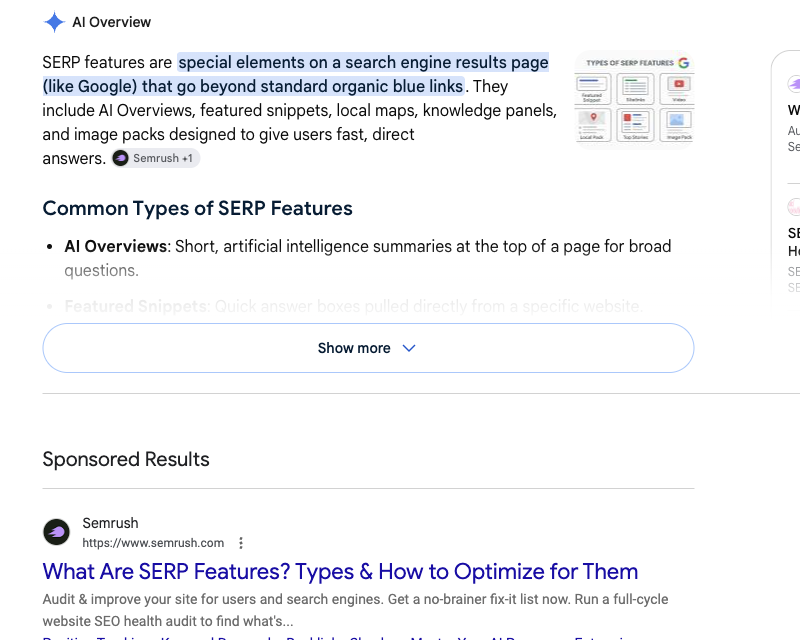
Search Google for a list of SERP features and the first thing you see is not an article. It’s an AI Overview. A SERP feature, explaining SERP features, sitting on top of ten pages that spent months trying to rank for that exact phrase.
That’s modern Google in one screenshot. A SERP feature is any element on a Google results page beyond the plain organic links and standard text ads, and there are 50 of them live right now.
The classic blue links are still there, but they share the page with answer boxes, carousels, panels, packs, and now AI-written summaries. Semrush measured it: only 1.53% of results pages show zero features at all.
TL;DR: Google currently shows 50 distinct SERP features, and only 1.53% of results pages display plain blue links with nothing else. Of those 50, you can directly optimize for 22, influence 16 indirectly, and the remaining 12 run on licensed data no website can enter. Google has also retired 8 features, so any strategy built on a single box carries expiry risk.
50
Live SERP features documented here
98.5%
Of SERPs show at least one feature
8
Features Google has retired
37
The most any other guide covers
Here’s what bugged us about the existing guides. The biggest one documents 37 features, another claims 37 and actually details 28, and most stop at 10 or 15. We parse millions of Google results pages every month running the FlyByAPIs Google SERP API , so we see every one of these boxes in the raw HTML, week after week, including the ones that quietly disappear.
So we wrote the version we wanted to read: all 50 features live on Google in 2026, what triggers each one, an honest verdict on whether you can win it, plus the 8 features Google killed, and a Python script to track the whole thing.
Bookmark it. This page is long on purpose.
Jump to a category
What does a SERP include in 2026?
Every Google results page is built from three layers. Paid placements sit at the top and bottom, and organic results fill the middle. Around them, Google injects enhanced elements pulled from its index, its Knowledge Graph, licensed data feeds, and now its Gemini models.
Those enhanced elements are what the industry calls SERP features: anything on the page that is not a plain blue link or a standard text ad.
Definition:
A SERP feature is any element on a Google results page that goes beyond the traditional organic result format. Featured snippets, People Also Ask boxes, knowledge panels, map packs, shopping grids, and AI Overviews are all SERP features. In 2026, Google shows 50 distinct ones.
Why does the exact count matter? Because each feature is a separate door onto page one.
Your page can rank #4 in the blue links and still sit above #1, inside a snippet, a PAA answer, or an AI Overview citation. Miss the feature, and a #1 ranking can quietly lose most of its clicks to the boxes stacked on top of it.
The catalog below groups all 50 by category. For every feature you get what it looks like, what triggers it, and a straight verdict: can you optimize for it, influence it indirectly, or should you save your energy?
The full list of SERP features at a glance
Use this table as your index. Every feature links down to its full entry.
| # | Feature | Category | Can you optimize? |
|---|---|---|---|
| 1 | AI Overviews | AI | Yes |
| 2 | AI Mode | AI | Indirect |
| 3 | Organic results | Core organic | Yes |
| 4 | Sitelinks | Core organic | Indirect |
| 5 | Featured snippet | Core organic | Yes |
| 6 | People Also Ask | Core organic | Yes |
| 7 | Related searches | Core organic | Indirect |
| 8 | People Also Search For | Core organic | Indirect |
| 9 | Review stars (rich results) | Core organic | Yes |
| 10 | Indented results | Core organic | Indirect |
| 11 | Image pack | Media | Yes |
| 12 | Video carousel | Media | Yes |
| 13 | Short videos | Media | Yes |
| 14 | Top stories | Media | Yes |
| 15 | Web stories | Media | Yes |
| 16 | Discussions and forums | Community | Yes |
| 17 | Perspectives | Community | Indirect |
| 18 | X (Twitter) pack | Community | Indirect |
| 19 | From sources across the web | Community | Indirect |
| 20 | Knowledge panel | Knowledge | Indirect |
| 21 | Knowledge card (instant answer) | Knowledge | No |
| 22 | Things to know | Knowledge | Indirect |
| 23 | Calculator | Knowledge | No |
| 24 | Unit converter | Knowledge | No |
| 25 | Currency converter | Knowledge | No |
| 26 | Weather box | Knowledge | No |
| 27 | Dictionary box | Knowledge | No |
| 28 | Sports scores | Knowledge | No |
| 29 | Stocks box | Knowledge | No |
| 30 | Public data | Knowledge | No |
| 31 | Song lyrics | Knowledge | No |
| 32 | Datasets | Knowledge | Yes |
| 33 | Scholarly articles | Knowledge | Indirect |
| 34 | Translation box | Knowledge | No |
| 35 | Local pack (map pack) | Local & travel | Yes |
| 36 | Hotel pack | Local & travel | Indirect |
| 37 | Flights widget | Local & travel | No |
| 38 | Destinations | Local & travel | Indirect |
| 39 | Events pack | Local & travel | Yes |
| 40 | Jobs pack | Local & travel | Yes |
| 41 | Shopping ads | Shopping | Yes (paid) |
| 42 | Popular products | Shopping | Yes |
| 43 | Shopping filters | Shopping | Indirect |
| 44 | Product rich results | Shopping | Yes |
| 45 | Top ads | Ads | Yes (paid) |
| 46 | Bottom ads | Ads | Yes (paid) |
| 47 | App pack | Utility | Yes |
| 48 | Recipes | Utility | Yes |
| 49 | Find results on | Utility | Indirect |
| 50 | See results about | Utility | Indirect |
Quick score across the full set:
- 22 features you can directly optimize for
- 16 features you can influence indirectly
- 12 features fed by licensed data, where your website is simply not invited
Knowing which is which saves you from chasing boxes you can never enter.
AI search features
The newest category, and the one reshaping everything else on the page.
1. AI Overviews
An AI-generated summary at the very top of the page, above every other result, with citation links to the sources Google’s model pulled from. It triggers mostly on informational queries: questions, comparisons, “how does X work” searches.
When an AI Overview appears it occupies the entire first screen on mobile, which is the scary part. The upside? The citation links get real clicks, and pages that rank in the top 10 are far more likely to get cited.
To get cited: answer the question directly in the first sentences of a section, use clear headings, and back claims with specific numbers. Checking which domains get cited for your keywords is easiest with structured Google search data you can diff over time.
AI Overviews love quotable, self-contained passages. It’s the same skill as winning featured snippets, pointed at a new box.
2. AI Mode
A full conversational search tab, powered by Gemini, that Google rolled out from 2025 onward. Instead of a results page, the user gets a chat answer with follow-up questions and a panel of source links.
You can’t “rank” in AI Mode the classic way. What you can do: be the source it quotes. Structured content, explicit facts, and strong entity signals raise your odds, and the playbook overlaps heavily with AI Overview citations, so one effort covers both.
Core organic SERP features
The enhancements attached to classic results. This is where most SEO effort pays off.
3. Organic results
Yes, the blue links themselves count as a feature now, which tells you everything about where Google is heading. Each result carries a favicon, site name, title, and description, and it’s the baseline every other feature competes against.
4. Sitelinks
Extra links displayed under a result, pointing to inner pages of the same site. Full sitelinks (up to 6 links in two columns) appear mostly for brand searches; smaller inline sitelinks show up everywhere.
You can’t submit sitelinks; Google picks them algorithmically. A clean site structure, descriptive anchor text, and a logical navigation are what tilt the choice. Bad sitelinks usually mean confusing internal linking.
5. Featured snippet
The answer box at position zero: a paragraph, list, table, or video extracted from a ranking page, shown with the source link below the text. It triggers on question and definition queries where Google is confident one passage answers it.
Featured snippets got demoted in visual weight since AI Overviews arrived, but they still show on millions of queries where AI Overviews don’t, and they still steal the top spot from #1.
The formula that keeps working for us: put the question in a heading, answer it in 40 to 60 words immediately below, then expand. Page-one results win almost all snippets, so this is a formatting game once you rank.
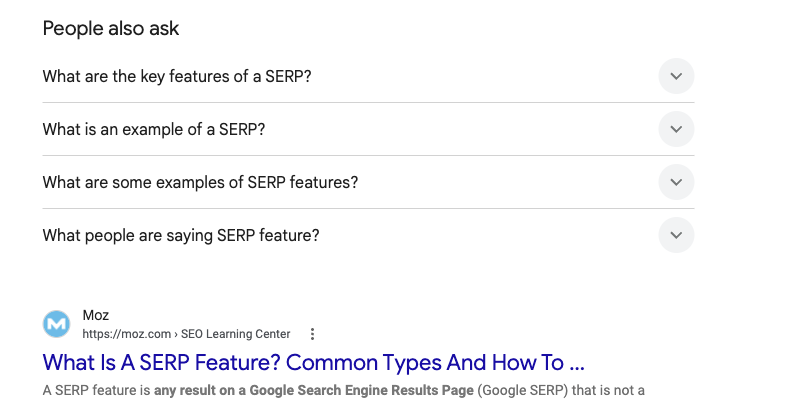
6. People Also Ask
The expandable question accordion, usually 4 questions that multiply as you click. Each answer is a mini featured snippet pulled from some page, with a link. PAA shows on the vast majority of informational SERPs.
PAA is criminally underrated as a content source. The questions are literal user queries, and answering them well can get you into dozens of PAA boxes across related SERPs. We pull People Also Ask data through the FlyByAPIs search API precisely because each question is a content brief someone already validated.
7. Related searches
The suggestion links at the bottom of the page (and increasingly injected mid-page as chips). They show what people search next when the current results don’t fully satisfy.
You can’t place your site inside the box, but you can rank for the queries inside it. Related searches are keyword research handed to you on the SERP itself; a Google search results API lets you harvest them across hundreds of seed terms in minutes.
8. People Also Search For
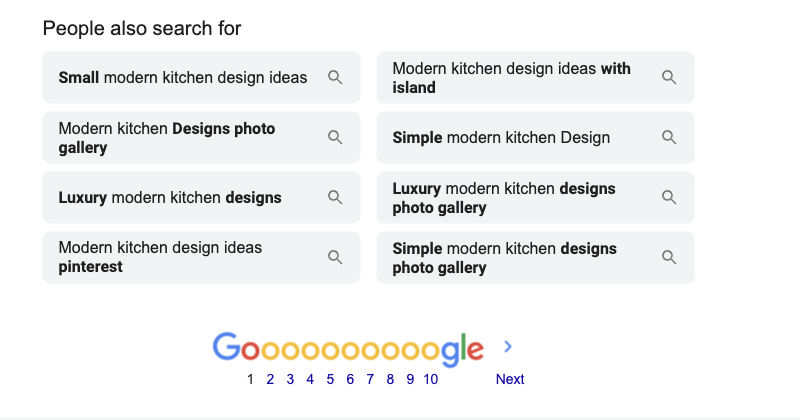
A sibling of related searches that appears when a user clicks a result and bounces back: Google slides a “People also search for” box under the visited result. On entity searches it also appears inside knowledge panels.
Same play as related searches: mine it, don’t chase it. It’s also a decent pogo-sticking signal; if Google shows PASF under your result a lot, users aren’t finding what they came for.
9. Review stars (rich results)
The orange star ratings, review counts, and price info attached to organic results. Powered by structured data on the page, and restricted to certain content types: products, recipes, books, courses, local businesses, software.
Add AggregateRating markup to eligible pages and validate it in Google’s Rich Results Test
. One warning: Google ignores self-serving review markup on pages without real reviews, and markup abuse can draw a manual action.
10. Indented results
When one domain earns two or three consecutive results, Google indents the extra ones under the first. It’s a visual grouping, not a separate index, and it means one site occupies multiple slots.
The indirect play: cover a topic with several strong pages targeting adjacent intents. When two of them rank close together, the indent doubles your real estate.
Bottom line for core organic features:
Featured snippets, PAA, and review stars are the three with direct, repeatable playbooks. Sitelinks and indents follow good architecture on their own. Related searches and PASF are research tools, not targets.
Media SERP features
Images, video, and news modules. These pull from separate Google indexes, which means separate optimization work.
11. Image pack
A horizontal row (or grid) of images inside the main results, linking into Google Images. Triggers when the query has visual intent: products, people, places, “X examples”, “X design”.
Descriptive filenames, real alt text, images near relevant text, and an image sitemap. Unglamorous work, but image packs appear on a large share of SERPs and most sites ignore them completely.

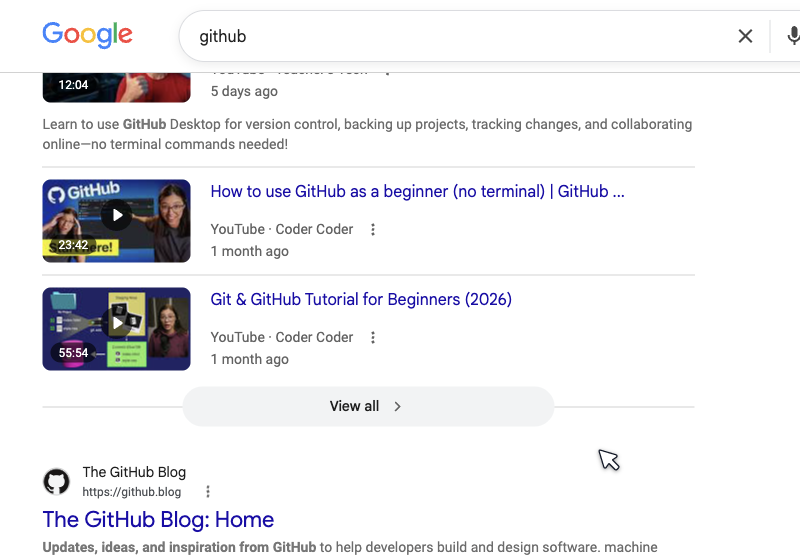
12. Video carousel
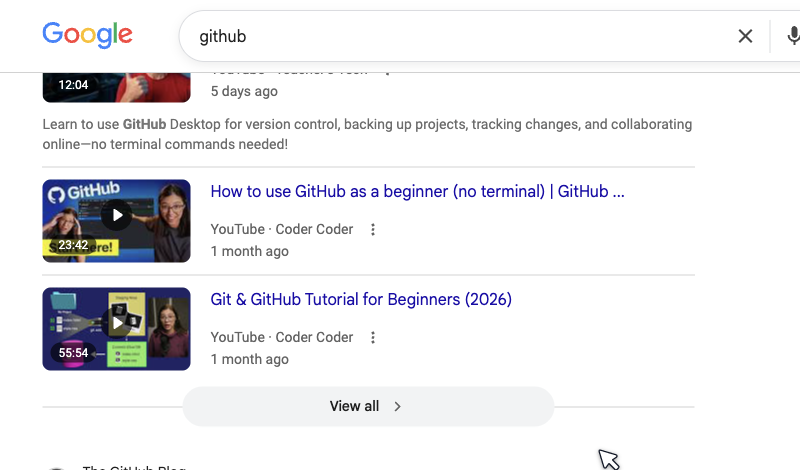
A scrollable row of video thumbnails, overwhelmingly YouTube, triggered by “how to” queries and anything where watching beats reading. Videos also appear as single rich results with key moments timestamps.
Straight advice: if a video carousel shows for your target keyword, Google has decided video intent exists. Either make the video or accept that part of the SERP is out of reach. VideoObject schema plus a transcript helps self-hosted video, but YouTube dominates this box.
13. Short videos
A newer module of vertical short-form clips: YouTube Shorts, TikTok, Instagram Reels. Mostly mobile, mostly on trend, recipe, fitness, and product discovery queries.
If your audience skews mobile, a 45-second vertical answer to a common question can outrank pages that took weeks to write. Low effort, weirdly low competition, for now.
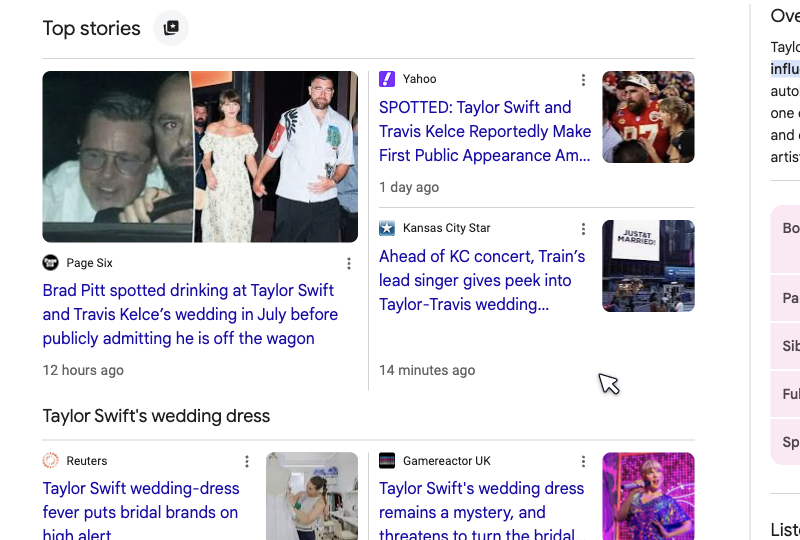
14. Top stories
The news carousel with article cards, timestamps, and publisher names. Triggers on newsworthy queries, and eligibility follows Google News content policies rather than a special sitemap.
You need to be a news source with author pages, dates, and original reporting. For everyone else the practical use is monitoring: when top stories appear on your keyword, expect the SERP to be volatile and CTRs to drop for evergreen pages.
15. Web stories
Google’s tappable, full-screen story format (the AMP-based one). They surface in a dedicated carousel, in Discover, and in image results. Google has de-emphasized them, but they still render in US SERPs for lifestyle and travel niches.
We’d only invest here if you’re already producing visual content at volume. The format’s future looks shaky, and we’ll cover the graveyard of similar features later in this guide.
Community and forum features
Google’s answer to the “reddit” suffix people kept typing. These modules exploded after the 2023 Helpful Content updates.
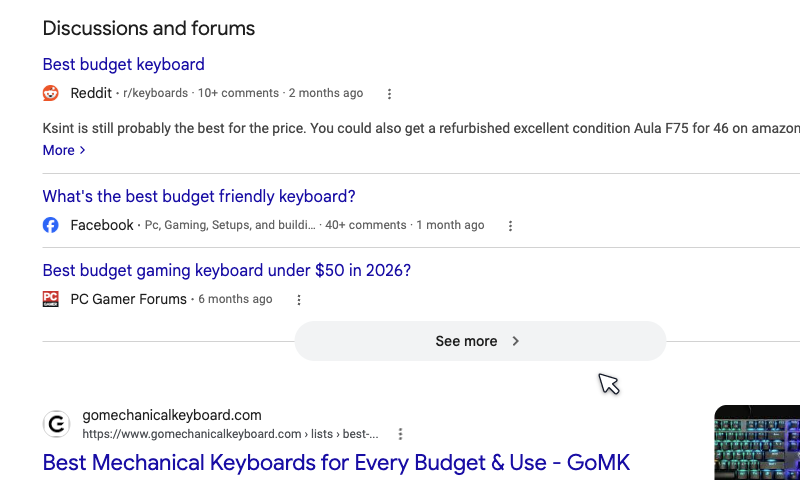
16. Discussions and forums
A module of threads from Reddit, Quora, Stack Exchange, and independent forums, with snippets of the top replies. Triggers on opinion, troubleshooting, and “is X worth it” queries where people want humans, not brands.
Two ways in. If you run a forum or active comments section, DiscussionForumPosting schema makes you eligible.
If you don’t, genuine participation in the threads that already rank puts your answers in front of that traffic. Genuine being the operative word; subreddits smell marketing instantly.
17. Perspectives
A filter and module surfacing first-person content: blog posts, videos, and social threads from individuals with visible authorship. Google’s bet that lived experience beats corporate content for some queries. Since 2024 Google has folded much of it into the Forums filter, so expect this one to keep mutating.
No schema switch to flip. Real author pages, bylines with history, and content that reads like a person wrote it are what qualify you. Which you should have anyway.
18. X (Twitter) pack
A carousel of recent posts from an X account, shown for brand and person searches. Its presence has flickered ever since X restricted Google’s data access in 2023, and it disappears for months at a time. Treat it as unstable real estate.
You only appear for searches about you (or topics you post about constantly). An active, consistent account is the whole strategy.
19. From sources across the web
An aggregation module that stitches short answers from multiple sites into one card, each with attribution. Think of it as a group featured snippet for queries with no single agreed answer.
Clear, extractable answers to the question raise your odds of being one of the stitched sources. Same passage-level writing that wins snippets and AI citations.
Knowledge and instant answer features
The biggest category: 15 features where Google answers directly on the page. Most are fed by the Knowledge Graph or licensed data, which is why so many get a “No” verdict. We’re not going to pretend otherwise.
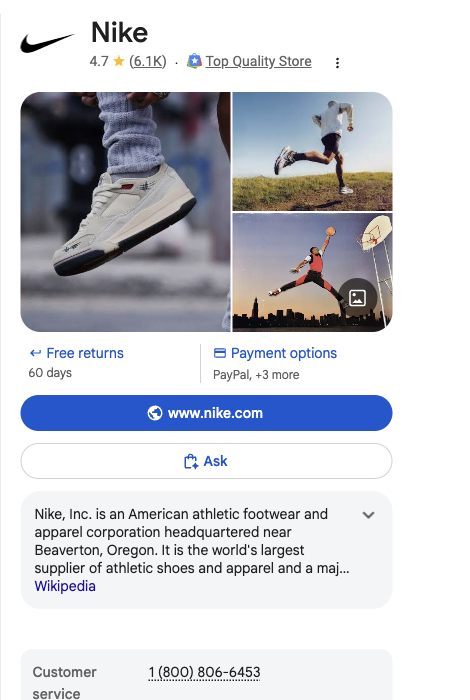
20. Knowledge panel
The large right-side panel (top of page on mobile) for entities: companies, people, places, products. It pulls from the Knowledge Graph, Wikipedia, Wikidata, and official sources, and includes social links, facts, and PASF chips.
You can claim your panel once it exists and suggest edits. Creating one requires becoming an unambiguous entity: consistent name and facts across your site, Organization schema, Wikidata presence, and coverage on authoritative sites. For company panels, Google leans on structured company databases; the same records you can pull with a Crunchbase company data API
feed how machines understand your business.
21. Knowledge card (instant answer)
The plain answer box for simple facts: “height of Everest”, “when was Google founded”. No link most of the time, just the answer, sourced from the Knowledge Graph or public databases.
The blunt verdict: you can’t enter this box, and the queries behind it are zero-click by design. Don’t build content strategies on pure-fact queries; the click never existed.
22. Things to know
An expandable module that breaks a broad topic into subtopics (“cost”, “benefits”, “how it works”), each expanding into snippet-like answers. Appears on broad informational queries.
Cover the subtopics Google already shows there, with heading-plus-answer formatting, and your passages become candidates. It’s the featured snippet game played across a whole topic cluster.
23–31. The instant answer widgets
Nine features share one story, so we’ll be efficient:
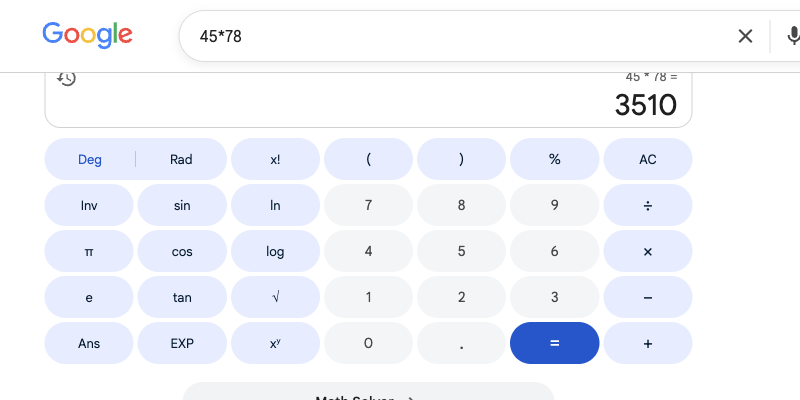
- The calculator (23) answers math typed into the search bar
- The unit converter (24) and currency converter (25) handle “10 km to miles” and “100 usd to eur”
- The weather box (26) renders forecasts from weather.com data
- The dictionary box (27) defines words from licensed dictionaries
- Sports scores (28) show live matches from sports data partners
- The stocks box (29) charts tickers from exchange feeds
- Public data (30) graphs population and economic stats from sources like the World Bank
- Song lyrics (31) print licensed lyrics in full
Every one of these boxes runs on licensed or internal data. No schema, no content, no backlink profile puts your site inside them. The only rational response: check whether your target keywords trigger these widgets, and if they do, expect near-zero clicks regardless of your ranking.
Pro tip:
Zero-click widgets double as a keyword research filter. If "usd to eur" style queries hide inside your keyword list, an automated SERP check flags them before you waste a content budget on them.
32. Datasets
For data-related searches, Google can show a dataset module linking into Google Dataset Search. Research portals, government data, and yes, commercial data providers appear here.
If you publish data, Dataset markup is nearly free visibility because almost nobody outside academia uses it.
33. Scholarly articles
A small module linking to Google Scholar results for academic-sounding queries: three citations with authors and years.
You get in by publishing in venues Google Scholar indexes. For most businesses this is a monitoring item, not a target.
34. Translation box
Type “translate hello to spanish” and Google renders an interactive Google Translate widget with the answer inline. Another fully closed, zero-click box.
One useful aside for builders: users who outgrow that widget want batch translation with formatting intact, which is exactly the job of a multi-format translation API rather than a search box.
Local and travel features
Where Google turns into a directory and a travel agency.
35. Local pack (map pack)
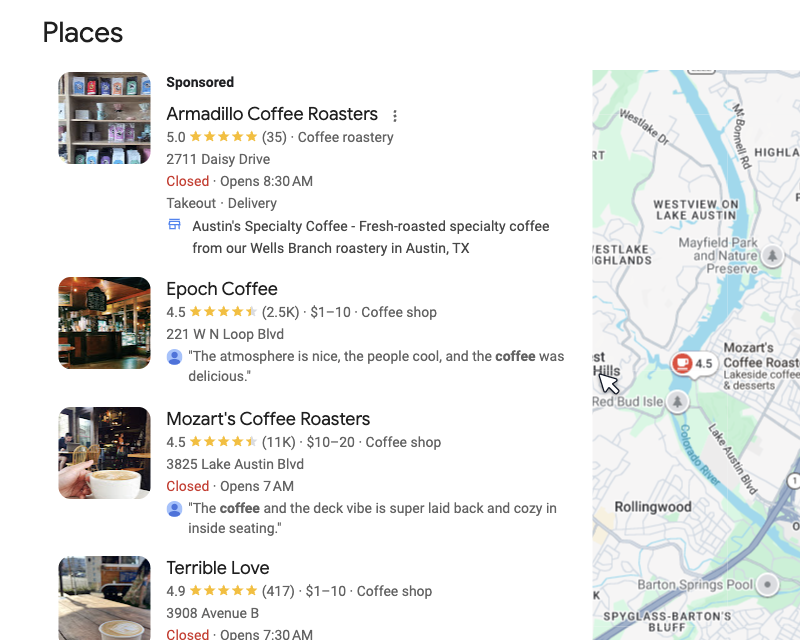
The map plus three business listings, with ratings, hours, and phone numbers. Triggers on any query with local intent, explicit (“dentist barcelona”) or implied (“coffee near me”). Clicks go into Google Business Profiles, not websites, unless the user clicks through.
The playbook is well mapped: a complete Google Business Profile, review velocity, correct categories, and consistent name-address-phone across the web. For anyone doing this at scale (agencies, lead gen, market research), pulling listings programmatically with a Google Maps data extraction API beats checking packs by hand, one city at a time.
36. Hotel pack
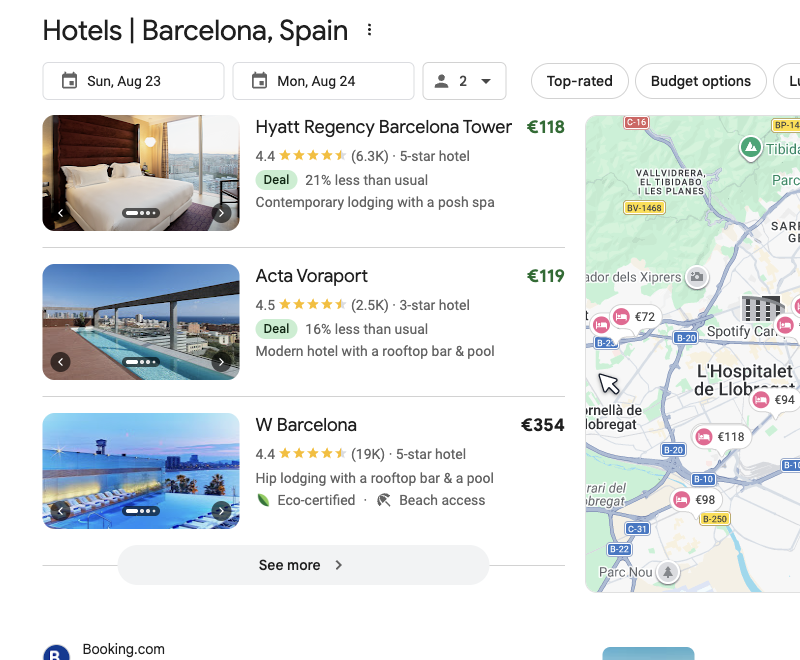
A specialized local pack for accommodation queries: map, price dates, filters, and booking links. Fed by Google Hotels and partner feeds, not by regular organic signals.
Hotels enter through a Business Profile plus rate feeds via connectivity partners. If you’re not the hotel or its channel manager, this box is closed.
37. Flights widget
The Google Flights module for route queries: prices, airlines, times, all inside Google’s own product. Airline sites and OTAs sit below it, losing clicks.
Airline data flows through licensed feeds. The widget is one of the clearest examples of Google keeping an entire vertical’s clicks for itself.
38. Destinations
For “places to visit in X” queries: a browsable module of destination cards with photos, flight prices, and itineraries.
Travel content ranking below it still gets clicks from researchers who want depth. Long-tail itinerary queries dodge the widget almost entirely.
39. Events pack
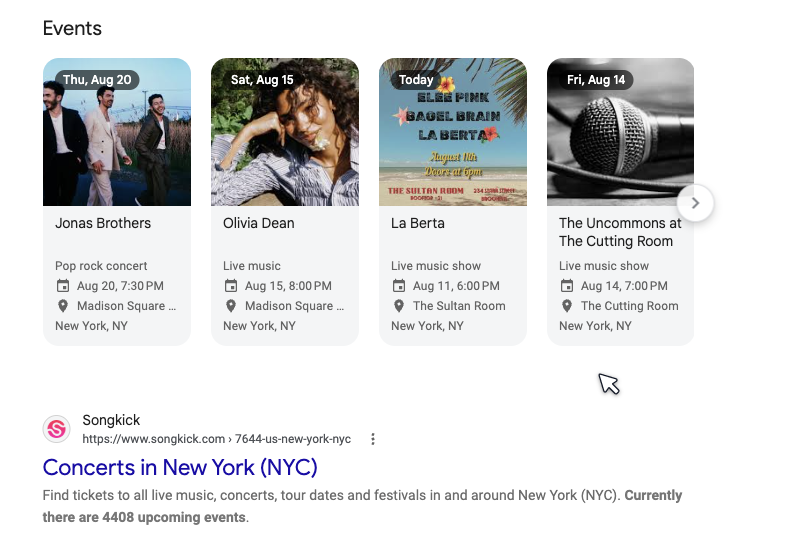
Concerts, meetups, exhibitions, listed with dates and venues for “events in X” and artist searches.
Event structured data on your event pages (or through platforms like Eventbrite that emit it for you) is the entry ticket. Small venues rank here with surprisingly little effort.
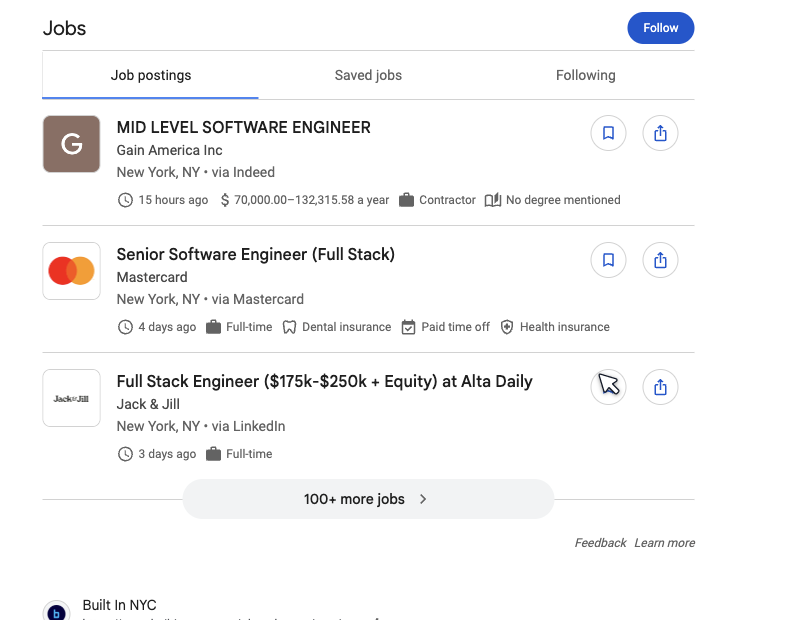
40. Jobs pack
The “Jobs” module with role cards, filters, and salary data, sitting above organic for almost any hiring query. It swallowed a huge share of job board traffic when it launched.
JobPosting markup plus indexable job pages gets your listings in. If you’re building anything on top of hiring data (salary benchmarks, lead gen, market maps), a job listings API
that aggregates postings saves you from scraping this pack yourself.
100 requests/month free · Hard limit, no surprise overage
Shopping and commerce features
The most monetized real estate on the page. Google rebuilt most of it around Merchant Center feeds.
41. Shopping ads
The product ad carousel (top or side) with images, prices, and store names. Pure pay-to-play through Google Ads plus a Merchant Center feed.
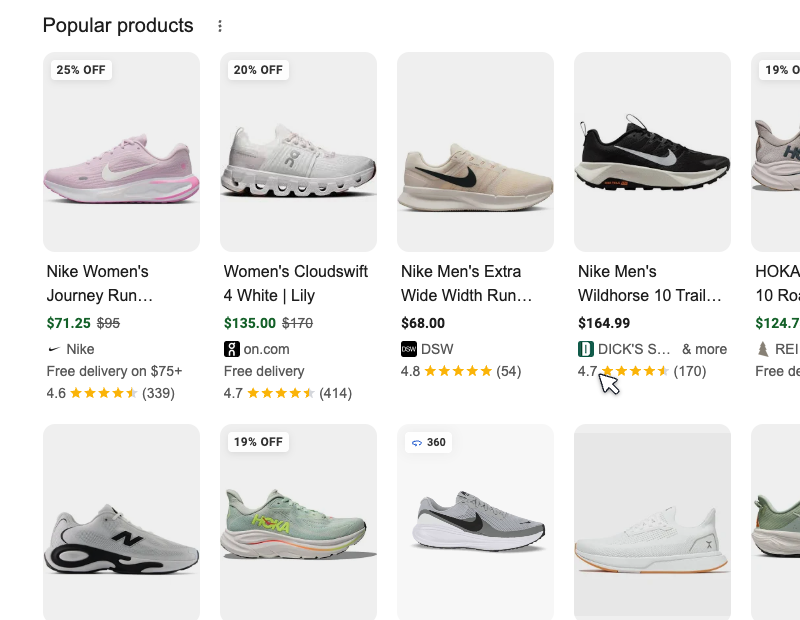
42. Popular products
The organic sibling: a free product grid pulled from Merchant Center feeds and product schema, with filters for style, price, and retailer. Dominant on apparel and consumer goods queries.
Free product listings changed e-commerce SEO: a complete feed now earns placement that used to require ad spend. Watching how your products and competitors’ rank inside these grids is its own discipline; teams tracking marketplaces pair it with an Amazon product data API to see the full retail picture beyond Google.
43. Shopping filters
The refinement chips and sidebar (“Under $50”, “Leather”, “On sale”) that Google auto-generates around shopping results.
Filters are built from aggregate product data. Rich, complete attributes in your feed (material, color, price, availability) make you eligible for more filter combinations.
44. Product rich results
Star ratings, price, and stock status attached to a normal organic result for a product page. The organic-listing version of shopping visibility.
Product markup with Offer and AggregateRating is table stakes for e-commerce now. Without it your listing looks naked next to competitors showing price and stars.
Ad features
Two features, one business model, and the reason everything else on this page exists.
45. Top ads
Up to four text ads above organic results, marked “Sponsored”. On commercial queries they push the first organic result below the fold entirely.
46. Bottom ads
The same ad format at the page bottom, catching users who scrolled past everything. Cheaper clicks, lower intent capture.
For SEO purposes, ads matter as a signal: heavy ad load on a keyword means high commercial value and less organic room. Count the ads before you commit the content budget.
Utility and niche features
The last four current features: small boxes with outsized value in their niches.
47. App pack
A block of mobile app results with icons, ratings, and install buttons, shown on mobile for “X app” and task queries. Rankings come from app store optimization signals, not web SEO.
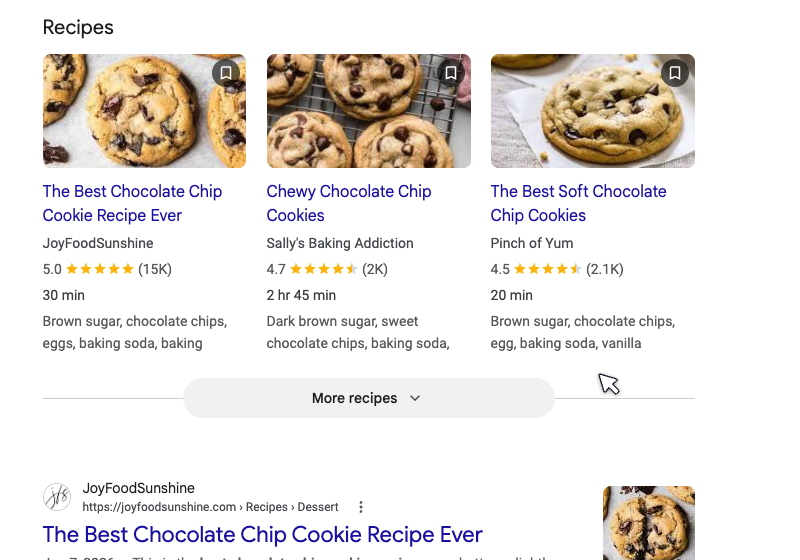
48. Recipes
Rich recipe cards with photos, ratings, cook time, and calories, in a grid or carousel. One of the oldest structured-data features and still one of the strongest.
Food sites live and die by Recipe markup: no schema, no card, no traffic. The more properties you fill (times, nutrition, ratings), the better the card, and eligibility is genuinely open.
49. Find results on
A row linking to category platforms (“Find results on Zillow, Realtor, Trulia”) for verticals where aggregators dominate: real estate, cars, used goods.
You either become one of the major platforms in your vertical (hard) or list your inventory on them (practical).
50. See results about
A disambiguation card when a query matches multiple entities: “See results about: Jaguar (animal) / Jaguar (car brand)”. Clicking refines the whole SERP.
If your brand shares a name with something famous, strong entity signals (schema, Wikidata, consistent facts) help Google offer your version as an option. That closes the list of the 50 living features.
The 8 SERP features Google removed
Nobody else writes this section, and it carries the most important lesson in the whole guide. SERP features die. Google has killed at least eight significant ones, some of which entire agencies built service lines around.
| Retired feature | Removed | What happened |
|---|---|---|
| FAQ rich results | 2023 | Expandable Q&A under results, restricted to government and health sites, then effectively gone |
| HowTo rich results | 2023 | Step-by-step cards, deprecated for all devices in September 2023 |
| Sitelinks search box | 2024 | The search-within-a-site box, removed for low usage |
| Cached page links | 2024 | The "Cached" button retired; Google now points to the Wayback Machine |
| Right-side featured snippet | 2020 | Snippets consolidated to the left column |
| In-depth articles | 2018 | Long-form journalism module folded into normal ranking |
| Podcasts carousel | 2023 | Playable episode carousel removed in 2023; Google Podcasts itself shut down a year later |
| AMP lightning badge | 2021 | The ⚡ icon dropped when page experience replaced AMP requirements |
The FAQ story deserves a pause. For years, FAQ schema was the easiest rich result on the internet; every SEO checklist included it.
Then Google announced in August 2023 that FAQ rich results would only show for authoritative government and health sites. Thousands of sites lost the visual real estate overnight. The markup still exists, the SERP feature effectively doesn’t.
The lesson:
Any strategy that depends on one SERP feature inherits that feature's mortality. Diversify across features, and track them over time so you notice the day one disappears. Your traffic report won't tell you why clicks dropped; the SERP will.
Mobile vs desktop: same query, different SERP
Another thing the standard guides skip: the feature set changes with the device. Run the same query on a phone and a laptop and you’re looking at two different pages.
Mobile-only or mobile-first
App packs, short videos, and web stories barely exist on desktop. AI Overviews and ads consume the entire first screen. PAA expands into near-infinite scroll.
Desktop-only layouts
Knowledge panels and shopping filters live in the right column, which simply doesn't exist on mobile. On phones they collapse into inline cards and horizontal chips.
Why care? Because rank tracking that ignores device splits lies to you. A Google SERP data API with country and language parameters at least keeps the geography honest while you audit devices by hand.
Position 3 on desktop might sit one scroll down. Position 3 on mobile, under an AI Overview, four ads, and a PAA box, can be five screens deep.
If your audience is 70% mobile, audit your SERPs on mobile. Most tools default to desktop because it’s cheaper to render.
Which SERP features are actually worth chasing?
Fifty features, but your time is finite. This is how we’d prioritize for a typical content or e-commerce site, based on click impact and how repeatable the win is.
| Feature | Click impact | Difficulty | Verdict |
|---|---|---|---|
| AI Overview citations | High and growing | Medium | Chase now |
| Featured snippets | High | Medium | Chase |
| People Also Ask | Medium, compounding | Low | Chase |
| Local pack | Very high locally | Medium | Chase if local |
| Product rich results | High for e-commerce | Low | Mandatory |
| Review stars | Medium (CTR lift) | Low | Easy win |
| Video carousel | Medium | High (new format) | If video-ready |
| Jobs / events / recipes packs | High in niche | Low (schema) | Mandatory in niche |
| Knowledge panel | Brand trust | High | Slow burn |
| Instant answer widgets | Zero click | Impossible | Skip |
One number worth internalizing: when a featured snippet or AI Overview answers the query fully, a large share of searches end with no click at all. The features you win need to either capture the click or put your brand name in front of the searcher. Both count; only one shows in analytics.
How to track SERP features with Python
Every tool mentioned in the guides ranking for this topic wants you inside their dashboard: SE Ranking, Semrush, GrowByData. Fair enough, dashboards are comfortable. But if you’re a developer, you can build feature tracking in under 50 lines and own the data.
You query a SERP API for each keyword you care about, parse the structured response, and log what appears. The FlyByAPIs Google Search API (SERP API) returns each SERP as JSON with the pieces that matter for content strategy: organic results with positions and domains, the People Also Ask questions, and People Also Search For terms. Full parameters live in the search endpoint docs .
| |
Run it daily on a cron job and you get something no dashboard gives you: a time series of PAA questions per keyword.
When a new question appears, that’s a content brief. When your domain enters the top 5 for a tracked term, you see the date. When the questions churn, the intent is shifting.
Why this beats eyeballing:
Checking 100 keywords by hand takes hours, and Google personalizes what you see. An API request with gl and hl parameters returns the same neutral SERP every time, for about $0.05 per 100 checks on our pricing.
Two caveats. First, this endpoint focuses on the content-strategy features; it doesn’t return every widget in this catalog (nobody needs the calculator in JSON). Second, if you want to compare providers before committing, we published the full price comparison of 10 SERP APIs with real per-request numbers, including where we lose.
How to find SERP feature opportunities
The features you can win are keyword-specific. Here’s the process we actually use, in four steps.
Map what each keyword's SERP already shows
Run your keyword list through a SERP check and log what comes back: PAA questions, PASF terms, and who owns the top positions. A PAA box means Google wants that format; check the widget-heavy queries by hand before spending budget on them.
Find almost-there rankings in Search Console
Filter question queries where you rank 2 to 10 with high impressions and low CTR. Those are pages one formatting pass away from a snippet or PAA slot.
Study the current holder's weakness
Read the passage that owns the snippet today. Outdated numbers, vague answers, or a 200-word ramble where 50 words would do are all beatable.
Ship the format, then re-check on a schedule
Add the direct answer under a matching heading, the schema where eligible, and re-run the SERP check weekly. Feature wins typically land within 2 to 6 weeks of re-crawling.
The whole loop runs on data you can pull automatically: the SERP tracking script above covers the PAA and organic side of steps 1 and 4, Search Console handles step 2, and step 3 is judgment. No enterprise dashboard required.
The takeaway
Fifty features live on Google today. Eight are dead. The blue links you learned SEO on are now one feature among many, and the page keeps mutating: AI Overviews didn’t exist three years ago, and this time next year the count won’t be 50.
If you write content
Chase featured snippets, PAA, and AI Overview citations. Same skill, three boxes: direct answers under clear headings.
If you're a local business
The local pack is your entire game. Business Profile completeness and review velocity beat every on-page trick.
If you sell products
Product schema and a complete Merchant Center feed are mandatory. Free listings earn what used to cost ad budget.
If you build tools
Track features programmatically. A daily snapshot of PAA questions and top domains per keyword is a moat your competitors' dashboards don't export.
We wrote this because we kept opening “complete” guides that stopped at 37. Now you have the actual map: which doors are open, which need a key, and which are painted on the wall.
100 requests/month free · Hard limit, no surprise overage
P.S. If you spot a feature we missed, email us. We’ll add it, credit you, and update the count in the title. That’s the deal with calling something complete.
Oriol.
